


SMS Thread Messaging Configurations

Before implementing a thread messaging application, developers should get familiar with the thread messaging configurations, detect supported common resources and the phone numbers that are assigned to the resources as well as the SMS recipients who eventually can send and receive SMS messages on behalf of the common resource.
Identify common resources
A common resource represents a shared entity whose phone number can be used for SMS thread messaging. A common resource can be either a call queue or a site (the main site or any sub-site if the account has the multi-site feature enabled).
To identify these resources, developers must retrieve their corresponding extension records using the appropriate APIs below:
-
Call queues: To retrieve the account’s call queue resources, call the List Call Queues API.
-
Sites: To retrieve the account’s site resources, call the List Sites API.
Important
- For the main site (Company site), developers must call the List Extensions API with the query parameter
type=CompanyExtensionto detect the resource Id and necessary info. The List Sites API returns only sub-sites if any are available. - IVR menus are considered common resources, but they do not have their own SMS recipient configuration. Instead, the SMS recipients for an IVR menu’s direct phone numbers are inherited from the site to which the IVR menu is assigned.
- For the main site (Company site), developers must call the List Extensions API with the query parameter
Alternatively, developers can call the List Extensions API with the query parameter type=Department&type=Site&type=CompanyExtension to detect the resource Id and necessary info.
The API returns a list of extension objects representing the requested resources. Each object contains key information about the resource, including the extension ID and name.
The extension ID uniquely identifies the common resource and can be used when calling other related APIs described later in this document. The name can be used to display a user-friendly label in your application interface when presenting the resource to users.
Multiple SMS recipients configuration
If an account has thread messaging enabled, each common resource provides a configuration option for assigning multiple SMS recipients. This allows multiple user extensions to be designated as SMS recipients (throughout this document, assigned SMS recipients are referred to as SMS handlers), enabling them to send and receive SMS messages using the common resource numbers in a collaborative, thread-based workflow.
Call queue SMS recipients configuration
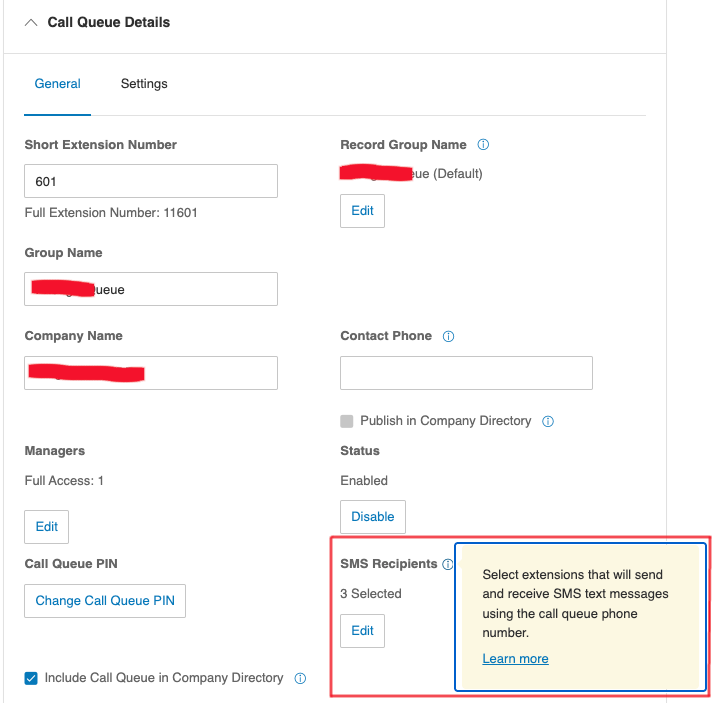
Example of a call queue SMS recipients configuration via the account admin portal.
Site SMS recipients configuration
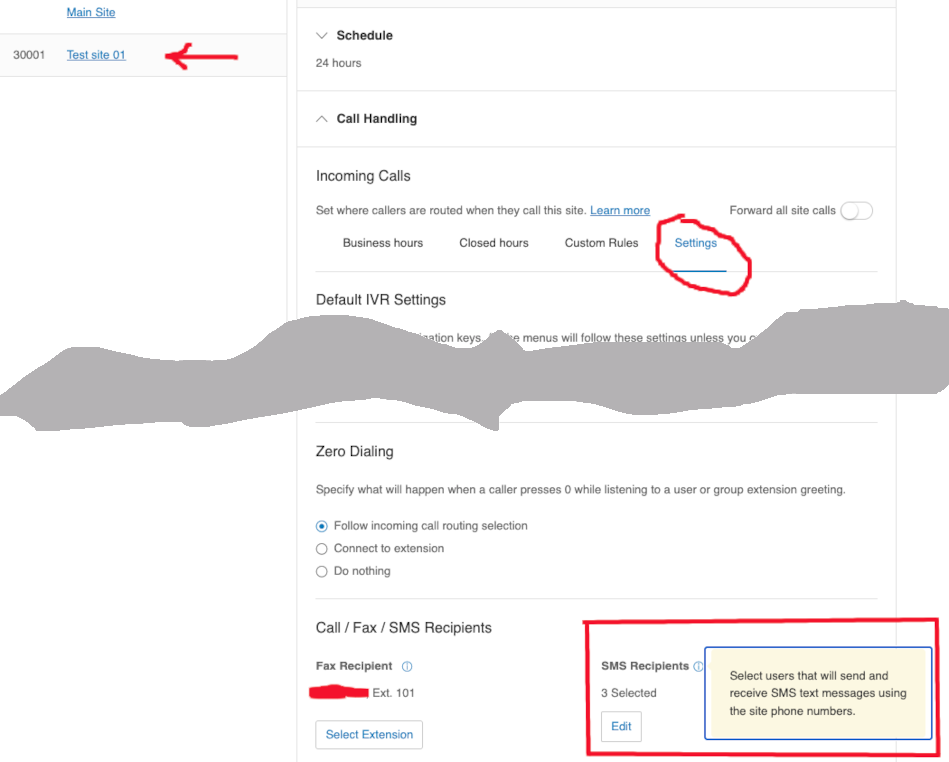
Example of a site SMS recipients configuration via the account admin portal.
Detect SMS recipients assigned to a common resource
To programmatically detect the user extensions that are assigned to handle SMS for a common resource, get the common resource extension Id and specify it in the path of the endpoint below, then call the endpoint and review the API response.
GET /restapi/v1.0/account/~/extension/{CommonResourceExtId}/sms-recipients
Sample response:
{
    "smsRecipients": [
        {
            "id": "710403052",
            "extensionNumber": "104",
            "name": "Sam R",
            "assignable": true,
            "hasLicense": true
        },
        {
            "id": "696667052",
            "extensionNumber": "102",
            "name": "Beth S",
            "assignable": true,
            "hasLicense": true
        },
        {
            "id": "696676052",
            "extensionNumber": "103",
            "name": "Federick J",
            "assignable": true,
            "hasLicense": true
        }
    ]
}
Update SMS recipients of a common resource
To programmatically assign new SMS handlers, or to remove existing SMS handlers from a common resource, developers can get the common resource extension Id and specify it in the path of the endpoint below, then call the endpoint with the body params as shown in the example below.
bodyParams = {
  addedExtensionIds: ["123456789", "987654321"],
  removedExtensionIds: [...]
}
POST /restapi/v1.0/account/~/extension/{CommonResourceExtId}/sms-recipients/bulk-assign
Hint
Detect user extension Ids by calling the List Extensions API with the query parameter type=User
Detect shared phone numbers from common resources
Phone numbers can be assigned to a common resource as its direct phone numbers. If these numbers are provisioned for SMS and associated with a valid SMS TCR campaign, all SMS recipients assigned to the common resource can use them to send and receive SMS messages.
Note
If a phone number is assigned as a direct number to an IVR menu, it is considered to belong to the site to which the IVR menu is assigned.
An example of an account's phone numbers assignment shown in the account admin portal. You can find the name of the resource from the "Assigned to" column, and the type of the resource from the "Type" column.

Detect main site (Company site) shared phone numbers
The main site's shared phone numbers are the following numbers:
- The account main company number.
- Any phone number assigned to the main site auto-receptionist.
- Any phone number assigned to an IVR menu associated with the main site.
An example of a main site IVR menu direct number

To programmatically detect the main site (Company site) shared phone numbers, developers can call the List Account Phone Numbers with the query parameter usageType=MainCompanyNumber&usageType=CompanyNumber
In addition, the main site may have associated IVR menus that have their own direct phone numbers. To identify these shared phone numbers programmatically, developers can call the List IVR Menus API to find the IVR menus associated with the main site, and then use the IVR menu extension IDs to retrieve their direct phone numbers from the List Account Phone Numbers API.
The sample code below demonstrates how to retrieve the direct phone numbers assigned to the main site (i.e. the company number(s) and the main company number), as well as the direct phone numbers assigned to IVR menus associated with the main site.
async function read_main_site_phone_numbers(){
  try{
    let queryParams = {
      usageType: ["MainCompanyNumber", "CompanyNumber"]
    }
    let endpoint = `/restapi/v2/accounts/~/phone-numbers`
    let resp = await platform.get(endpoint, queryParams)
    let jsonObj = await resp.json()
    let mainSiteSharedPhoneNumbers = {
      name: "Main site",
      ivrMenus: [],
      phoneNumbers: []
    }
    for (let record of jsonObj.records){
      if (record.type == "FaxOnly") continue

      let item = {
        type: record.usageType,
        phoneNumber: record.phoneNumber
      }
      mainSiteSharedPhoneNumbers.phoneNumbers.push(item)
    }
    await read_main_site_ivr_menus(mainSiteSharedPhoneNumbers)
  }catch(e){
    console.log(e.message)
  }
}

async function read_main_site_ivr_menus(mainSiteSharedPhoneNumbers){
  try{
    let queryParams = {
      type: ["IvrMenu"]
    }
    let endpoint = '/restapi/v1.0/account/~/extension'
    let resp = await platform.get(endpoint, queryParams)
    let jsonObj = await resp.json()
    for (var record of jsonObj.records) {
      if (record.site.name == 'Main Site') {
        let item = {
            name: record.name,
            id: record.id
        }
        mainSiteSharedPhoneNumbers.ivrMenus.push(item)
      }
    }
    await read_ivr_menu_phone_numbers(mainSiteSharedPhoneNumbers)
  }catch(e){
    console.log(e.message)
  }
}

async function read_ivr_menu_phone_numbers(mainSiteSharedPhoneNumbers){
  try{
    let queryParams = {
      usageType: ["DirectNumber"]
    }
    let endpoint = `/restapi/v2/accounts/~/phone-numbers`
    let resp = await platform.get(endpoint, queryParams)
    let jsonObj = await resp.json()
    for (var record of jsonObj.records){
      for (var menu of mainSiteSharedPhoneNumbers.ivrMenus){
        if (menu.id == record.extension.id){
          let item = {
            type: "IvrMenuDirecNumber",
            phoneNumber: record.phoneNumber
          }
          mainSiteSharedPhoneNumbers.phoneNumbers.push(item)
          break
        }
      }
    }
    console.log("Main site shared numbers", JSON.stringify(mainSiteSharedPhoneNumbers, null, 4))
  }catch(e){
    console.log(e.message)
  }
}
Detect sub-site shared phone numbers
A sub-site exists if an account has the multi-site feature enabled. The sub-site's shared phone numbers are the following numbers:
- The sub-site direct phone number(s).
- Any phone number assigned to an IVR menu under the sub site.
An example of a sub-site's IVR menu direct number

The sample code below demonstrates how to retrieve direct phone numbers assigned to all sub-sites, as well as direct phone numbers assigned to IVR menus associated with each site.
async function read_sub_sites(){
  try{
    let endpoint = `/restapi/v1.0/account/~/sites`
    let resp = await platform.get(endpoint)
    let jsonObj = await resp.json()
    let subSites = []
    for (var record of jsonObj.records){
      if (record.id != 'main-site') {
        let item = {
          name: record.name,
          id: record.id,
          ivrMenus: [],
          phoneNumbers: []
        }
        subSites.push(item)
      }
    }
    await list_subsite_ivr_menus(subSites)
  }catch(e){
    console.log(e.message)
  }
}

async function list_subsite_ivr_menus(subSites){
  try{
    let queryParams = {
      type: ["IvrMenu"]
    }
    let endpoint = '/restapi/v1.0/account/~/extension'
    let resp = await platform.get(endpoint, queryParams)
    let jsonObj = await resp.json()
    let ivrMenus = []
    for (var record of jsonObj.records) {
      if (record.site.hasOwnProperty("id")) {
        let site = subSites.find(s => s.id == record.site.id)
        let menu = {
          name: record.name,
          id: record.id
        }
        site.ivrMenus.push(menu)
      }
    }
    await read_sub_site_direct_phone_numbers(subSites)
  }catch(e){
    console.log(e.message)
  }
}

async function read_sub_site_direct_phone_numbers(subSites){
  try{
    let queryParams = {
      usageType: ["DirectNumber"]
    }
    const forLoop = async _ => {
      for (let site of subSites){
        let endpoint = `/restapi/v1.0/account/~/extension/${site.id}/phone-number`
        let resp = await platform.get(endpoint, queryParams)
        let jsonObj = await resp.json()
        for (let record of jsonObj.records){
          if (!record.extension){
            // site direct number record
            let item = {
              type: "SiteDirectNumber",
              phoneNumber: record.phoneNumber
            }
            site.phoneNumbers.push(item)
          }else{
            // IVR menu number record
            let menu = site.ivrMenus.find(m => m.id == record.extension.id)
            if (menu){
              let item = {
                type: "IvrMenuDirecNumber",
                phoneNumber: record.phoneNumber
              }
              site.phoneNumbers.push(item)
            }
          }
        }
      }
    }
    await forLoop()
    console.log("Sub site(s) shared numbers:", JSON.stringify(subSites, null, 4))
  }catch(e){
    console.log(e.message)
  }
}
Detect call queue shared phone numbers
A call queue's shared phone numbers are the direct number(s) assigned to a call queue:
An example of a call queue's direct number

The sample code below demonstrates how to retrieve direct phone numbers from call queues.
async function read_call_queues(){
  try{
    let endpoint = `/restapi/v1.0/account/~/call-queues`
    let resp = await platform.get(endpoint)
    let jsonObj = await resp.json()
    let callqueues = []
    for (var record of jsonObj.records){
      let item = {
        name: record.name,
        id: record.id,
        phoneNumbers: []
      }
      callqueues.push(item)
    }
    await read_call_queue_phone_numbers(callqueues)
  }catch(e){
    console.log(e.message)
  }
}

async function read_call_queue_phone_numbers(callqueues){
  try{
    let queryParams = {
      usageType: ["DirectNumber"]
    }
    let endpoint = `/restapi/v2/accounts/~/phone-numbers`
    let resp = await platform.get(endpoint, queryParams)
    let jsonObj = await resp.json()
    for (var record of jsonObj.records){
      for (var callqueue of callqueues){
        if (callqueue.id == record.extension.id)
          callqueue.phoneNumbers.push(record.phoneNumber)
      }
    }
    console.log("Call queue shared numbers", JSON.stringify(callqueues, null, 4))
  }catch(e){
    console.log(e.message)
  }
}