


SMS Thread Messaging


Developers should familiarize themselves with RingCentral's SMS content and messaging policies
Thread messaging organizes messages into logical conversations or “threads,” allowing related messages to be grouped together under a single context. Instead of treating every message as a separate, standalone event, thread messaging links replies, updates, and follow-ups to an original message or topic.
A message thread represents a text conversation between a specific pair of phone numbers—typically between a service number and a customer number. Threading improves readability, traceability, and context retention, especially in environments where SMS messages are shared among multiple handlers through collaboration tools such as a shared inbox. RingCentral Thread Messaging is designed to support SMS communication for common resources that have direct phone numbers or shared numbers belonging to that resource such as a site’s IVR direct number. These resources are call queues and sites (including the main-site). Throughout this document, these resources and their associated direct phone numbers are referred to as common resources and shared phone numbers, respectively. The term Thread Messaging refers to the Shared Inbox feature at the product level.
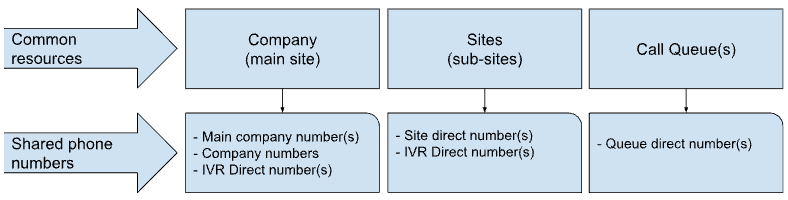
Sub-sites are available for RingCentral accounts that have the multi-site feature enabled.
Key features of SMS thread messaging
RingCentral SMS thread messaging provides the following capabilities:
- Shared message handling – Allows multiple user extensions to send and receive SMS messages using a shared phone number.
- Automatic thread creation – Organizes conversations into message threads based on the combination of a shared phone number and a customer phone number.
- Thread management – Supports thread-level properties such as assignee and resolved status to help manage conversations.
- Automatic opt-out handling – Automatically detects and handles recipients who have opted out of receiving messages.
Requirements
- A Business SMS Booster license must be purchased and assigned to a user extension.
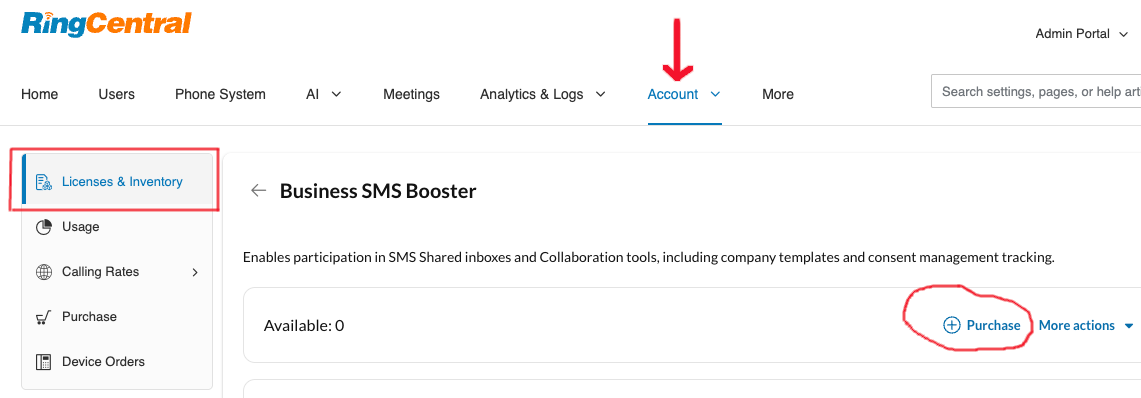
- The license is transferable from one user extension to another user extension.
- Call queues and Sites support are enabled separately. Customer accounts may have both common resource types enabled or just one of them or none.
Detect the thread messaging feature
To programmatically determine whether your account has the thread messaging feature enabled, call the endpoint below and review the API response.
GET /restapi/v1.0/account/~/extension/~/features?featureId=MessageThreads
If the thread messaging feature is not enabled, the response will be:
{
    "records": [
      {
        "id": "MessageThreads",
        "available": false,
        "reason": {
          "code": "ServicePlanLimitation",
          "message": "The feature is unavailable for the current service plan"
        }
      }
    ]
}
If the thread messaging feature is enabled, the response will be:
{
    "records": [
      {
        "id": "MessageThreads",
        "available": true,
        "params": [
          {
            "name": "callQueueSupported",
            "value": "true"
          },
          {
            "name": "siteSupported",
            "value": "true"
          }
        ]
      }
    ]
}
Use case example
A financial advising team using a call queue number for SMS
A financial advising team wants to maintain direct communication with clients through SMS. There are 4 advisors in the team and each advisor manages a specific group of clients based on category or service tier. All advisors are required to use the same call queue direct number (+1-555-987-XXXX) to send appointment reminders, respond to inquiries, and share updates on financial plans.
This setup ensures that:
- Shared visibility: All advisors assigned as SMS handlers can view the full message history for each client, ensuring consistent and informed communication.
- Clear ownership: Thread messaging allows individual advisors to be assigned to specific client threads, making it easy to track responsibility and reduce confusion.
- Continuity and context retention: Even if an advisor is unavailable, another team member can review the thread and continue the conversation without losing context.
- Improved collaboration: Multiple advisors can work from the same shared number while still maintaining organized, client-specific message threads.
- Enhanced customer experience: Clients receive seamless communication from a single, recognizable number, regardless of which advisor responds.
If another advisor in the firm joins the financial advising team, the system administrator can add that advisor to the call queue SMS recipients list through the RingCentral Admin Portal.
If an advisor from the financial advising team leaves the team or the firm, the system administrator can remove that advisor from the call queue SMS recipients list through the RingCentral Admin Portal.
Thread Messaging API
The Thread Messaging APIs can be used to build SMS shared inbox functionality within your own application or as part of an integration with other systems. These APIs enable multiple SMS handlers to access, manage, and collaborate on message threads associated with shared phone numbers or common resources.
By leveraging the Thread Messaging APIs, developers can implement features such as thread assignment, message visibility across team members, real-time updates, and conversation tracking—providing a centralized and collaborative messaging experience similar to a shared inbox.
The following guides have been created to assist developers in getting started quickly: