


RingCX Embeddable


Introduction
RingCX Embeddable is an out-of-the-box embeddable web application that help developers to integrate RingCentral RingCX services to their web applications with a few lines of code.
This is a beta release. We welcome your feedback and bug reports — please feel free to open an issue on GitHub.
Supported features
- Agent states
- Voice queues
- Dial modes
- Manual
- Predictive dial mode
- Preview dial mode
- Call disposition
- Notes
- Disposition
- AI Summary
Visit Online
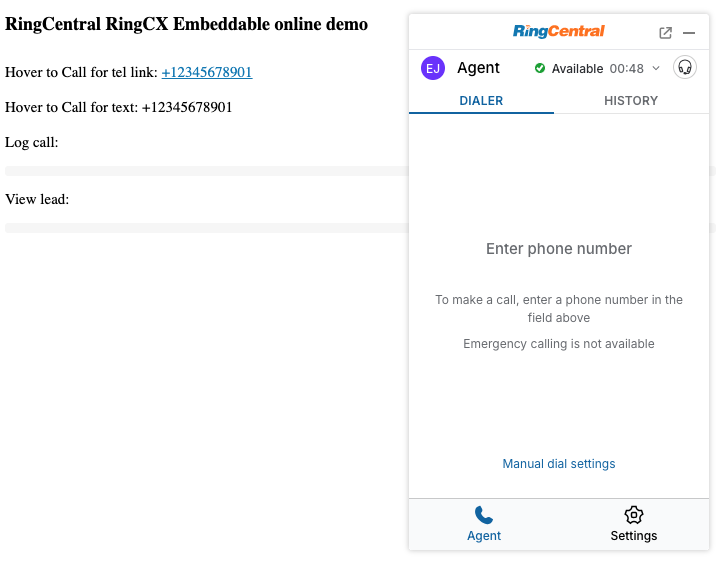
Visit the online demo: https://cdn.labs.ringcentral.com/ringcx-embeddable/1.0.0/index.html
Inject into Web app
Add the following code into any web app's page to make it work:
<script>
  (function() {
    var rcs = document.createElement("script");
    rcs.src = "https://cdn.labs.ringcentral.com/ringcx-embeddable/1.0.0/adapter.js";
    var rcs0 = document.getElementsByTagName("script")[0];
    rcs0.parentNode.insertBefore(rcs, rcs0);
  })();
</script>
Once injected, you can interact with the widget through the global RCAdapter object, for example to start a call:
RCAdapter.clickToDial(phoneNumber);
You can also register a logger and contact matcher service to listen to events from the widget and log calls or match contacts:
var registered = false;
window.addEventListener('message', function(event) {
  var message = event.data;
  if (!registered && message && message.type === 'rc-ev-init') {
    registered = true;
    RCAdapter.registerService({
      name: 'TestService',
      callLoggerEnabled: true,
      contactMatcherEnabled: true, // match contact with phone number
      callLogMatcherEnabled: true, // match call log entity with call id
      leadViewerEnabled: true, // add "view lead" button
    });
    RCAdapter.transport.addListeners({
      push: function (data) { // listen push event from rc widget
        // new call event
        if (data.type === 'rc-ev-newCall') {
          console.log('new call:', data.call);
        }
        if (data.type === 'rc-ev-ringCall') {
          console.log('ringing call:', data.call);
        }
        // lead events
        if (data.type === 'rc-ev-loadLeads') {
          // agent fetch leads event
          console.log(data.leads);
        }
        if (data.type === 'rc-ev-callLead') {
          // agent call lead event
          console.log(data.lead);
          console.log(data.destination); // phone number
        }
        if (data.type === 'rc-ev-manualPassLead') {
          // agent pass lead event
          console.log(data.lead);
          console.log(data.dispositionId);
          console.log(data.notes);
          console.log(data.callback); // if need to call back
          console.log(data.callbackTime); // call back time
        }
      },
      request: function (req) { // listen request event from rc widget
        var payload = req.payload;
        // handle log request
        if (payload.requestType === 'rc-ev-logCall') {
          console.log('logCall:', payload.data);
          RCAdapter.transport.response({
            requestId: req.requestId,
            result: 'ok',
          });
          return;
        }
        // handle match contacts request
        if (payload.requestType === 'rc-ev-matchContacts') {
          var queries = payload.data;
          console.log('matchContacts:', queries);
          var contactMapping = {};
          queries.forEach(function (query) {
            contactMapping[query.phoneNumber] = [{
              id: query.phoneNumber,
              type: 'TestService',
              name: 'Test User ' + query.phoneNumber,
              phoneNumbers: [{
                phoneNumber: query.phoneNumber,
                phoneType: 'direct',
              }]
            }]; // Array
          });
          RCAdapter.transport.response({
            requestId: req.requestId,
            result: contactMapping,
          });
          return;
        }
        // handle match call logs request
        if (payload.requestType === 'rc-ev-matchCallLogs') {
          var queries = payload.data;
          console.log('matchCallLogs:', queries);
          var callLogMapping = {};
          // match the logged call entity
          callLogMapping[queries[0]] = [{
            id: your_logged_call_entity_id, // logged call entity id
          }];
          RCAdapter.transport.response({
            requestId: req.requestId,
            result: callLogMapping,
          });
          return;
        }
        // handle view lead request
        if (payload.requestType === 'rc-ev-viewLead') {
          var lead = payload.data;
          console.log('agent want to view lead: ', lead);
          RCAdapter.transport.response({
            requestId: req.requestId,
            result: 'ok',
          });
          return;
        }
      }
    });
  }
});
See API, Message Transport and Call Events for the full message and event reference.
Documentation
Check source code from the RingCX Embeddable GitHub repository. See the following guides for full details: