


Bot and IVA SIP integration


This guide describes an interface between RingCentral and the Bot Partner Platform based on the SIP protocol.
SIP offers a standard way of establishing audio streams between two parties as well as a way of pathing data between parties.
Advantages:
- Simple method of integration minimizing race conditions
- Allows developers to reuse existing SIP based security mechanisms: SRTP, sips, SBC, SIP trunks, IP whitelisting
Limitations:
- Potential issues with the size of the custom data
RingCX Configuration
Before implementing this SIP-based integration, you'll need to register your IVA and add it to a workflow in the RingCX admin console. This includes providing your IVA's SIP URI, selecting a transport type (UDP, TCP, or TLS), and placing the IVA node in Workflow Studio.
For full setup instructions, see Integrating a SIP-based IVA in RingCX on the RingCentral Support site.
IVA connection results
When the IVA session ends, the call returns to the workflow and follows one of three configured paths:
| Result | Description |
|---|---|
| Success | The IVA session completed and returned a result. The customer is still connected and the workflow continues. |
| Failed | The IVA session did not complete successfully. The customer is still connected and the workflow continues via the error handling path. |
| Disconnected | The customer disconnected before or during the IVA session. The workflow does not continue and no further connections are executed. |
Passing context to your IVA
RingCX can pass session context to your IVA at the start of the session. Context is set on the sessionData property in a JavaScript node placed before the IVA node in Workflow Studio:
// Set sessionData with an embedded object
sessionData = { date: "Fri Feb 16 11:54", botData: { username: "[email protected]", ani: "+16058779330" } };
A context filter can be configured on the IVA node to send only a subset of sessionData to your IVA. For example, if the filter is set to botData, the IVA receives only:
{ "username": "[email protected]", "ani": "+16058779330" }
After the IVA session completes, any metadata returned by the IVA is available in sessionData and can be read in a subsequent JavaScript node:
// Metadata sent by the AI Bot = { "intent" : "Technical Support" }
ivr.debug(sessionData.intent);

if (sessionData.intent == "Technical Support") {
    ivr.setConnection("transfer_support");
}
For more detail on sessionData and context filters, see Providing context for the IVA integration in the RingCentral Support documentation.
Implementation
The following guide for developers helps developer connect, update, and disconnect a bot from the interaction.
Bot Connection
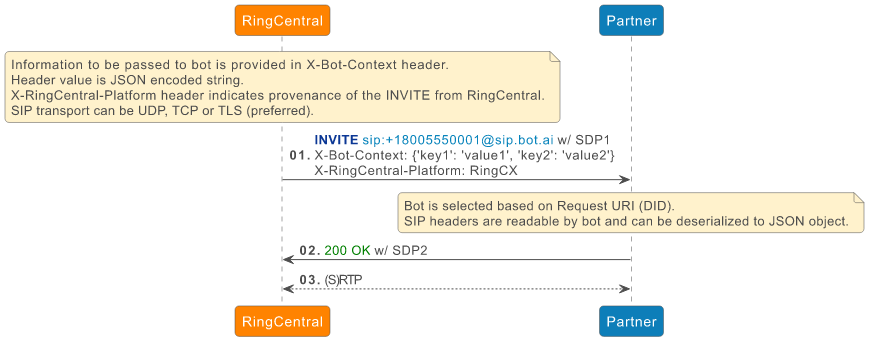
SIP transport between RingCentral and Partner can be:
- UDP
- TCP
- TLS (recommended)
Note
Recommended transport is TLS. When using TLS, RingCentral will try negotiating encrypted media (RTP/SAVP).
Currently, bot selection is based on the Request-URI user part (aka DID).
Bot selection can also be based on a configured SIP header.
In general, SIP headers shall be available from the bot flow engine.
Authentication between RingCentral and Bot Partner Platform
There is no authentication mechanism per se. A typical implementation relies on IP address allowlisting. The required list of RingCentral public IP addresses used to establish SIP dialogs with the bot is documented in the IP Supernets section of the RingCentral Network Requirements Documentation.
Bot Update
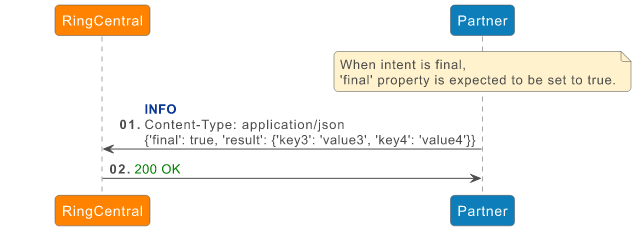
At any point during the flow, a bot can provide data to RingCentral. Data exchange between the developer and RingCentral is based on SIP INFO message. Data can be provided in the SIP INFO payload. Currently a JSON-encoded payload is the only format supported. In this case, Content-Type header is set to application/json.
The bot flow shall allow the end-user specifying the JSON data.
When providing a final intent, JSON ‘final’ property is expected to be set to true.
Bot Disconnection
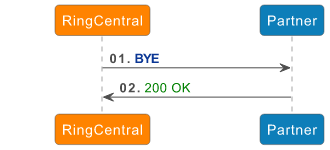
Although a developer may disconnect their bot at any time, it is expected that the disconnection will be initiated by RingCentral, after final intent is received from bot. A simple BYE request is used to disconnect the bot.
Connection Reuse
With TCP or TLS transport, RingCX establishes the connection toward the 3rd-party bot destination, and an INVITE message is sent over that establishes the connection. In this case, RingCX does not expect (and does not support) receiving SIP messages (neither responses to the INVITE nor in-dialog requests) on the provided address specified in Contact header. Instead, any SIP message from the bot is expected to be sent to RingCX over the established TCP/TLS connection.
In order to keep the connection alive, RingCX periodically sends a “ping” packet as described in RFC 5626. It is not required for the 3rd-party bot to reply with a “pong” message.